

The Ultimate AI Headshot Generator for Professional & Business Portraits
The importance of a professional headshot cannot be overstated. Whether you’re updating your LinkedIn profile, creating a company website, or preparing marketing materials, a high-quality business portrait is essential. Enter the AI headshot generator – a revolutionary tool that’s changing the game for professional and business headshots. This article will explore the best AI headshot generators available and how they can transform your professional image.





What are AI professional headshots?
- AI can create professional-looking headshots really quickly without needing to book a photographer or set up a photoshoot, saving businesses a lot of time.
- It can generate consistent headshots for all employees, making the whole team look professional and unified online, like on a company website.
- Businesses can often get high-quality headshots using AI for a lot less money than hiring a professional photographer for everyone.
- With AI, even if someone joins the company later, it’s easy to create a new headshot that matches everyone else’s, keeping the professional image consistent.
What is an AI headshot generator & how does it work?
An AI headshot generator is a cutting-edge technology that uses artificial intelligence to create professional-looking portraits from simple selfies or existing photos. These sophisticated tools leverage advanced AI models to analyze facial features, enhance image quality, and generate lifelike business headshots in a matter of minutes. The process is simple: upload your photo, and the AI works its magic to produce a polished, professional result.
Key features of professional AI headshot tools
Professional AI headshot tools offer a range of features designed to create stunning business portraits. These may include background removal and replacement, outfit customization, facial expression adjustment, and even age modification. Many AI headshot generators also provide options for different lighting scenarios, allowing users to achieve the perfect look for their professional image. Additionally, some tools offer batch processing capabilities, making it easy to generate consistent corporate headshots for entire teams or organizations.
How AI models create realistic business portraits
The process of creating realistic business portraits using AI involves several steps. First, the AI model analyzes the input image, identifying key facial features and characteristics. It then applies various enhancements, such as improving skin tone, adjusting lighting, and refining details. The AI also considers factors like facial expression, head positioning, and overall composition to ensure the final result looks natural and professional. Advanced AI headshot generators can even synthesize new details, such as adding or modifying hair styles, to create a more polished appearance.
Understanding the technology behind AI headshot generators
The technology powering AI headshot generators is based on deep learning algorithms and neural networks. These AI models are trained on vast datasets of professional photographs, learning to recognize and replicate the characteristics of high-quality headshots. By analyzing facial features, lighting, and composition, the AI can transform a simple selfie into a studio-quality portrait. The best AI headshot generators use state-of-the-art generative adversarial networks (GANs) to create incredibly realistic images that can be almost indistinguishable from those taken by professional photographers.
What are the benefits of using an AI headshot generator for professional photos?
The rise of AI headshot generators has brought numerous advantages to individuals and businesses seeking professional portraits. These tools offer a convenient and cost-effective alternative to traditional photography, while still producing high-quality results. Let’s explore some of the key benefits of using an AI headshot generator for your professional photos.
Consistency in corporate headshots across teams
For businesses, maintaining a consistent visual brand identity is crucial. AI headshot generators excel at producing uniform, high-quality headshots for entire teams or organizations. By using the same AI tool and settings, companies can ensure that all employee portraits have a cohesive look and feel, regardless of when or where they were taken. This consistency is particularly valuable for corporate websites, company directories, and marketing materials, where a unified visual presentation can enhance the professional image of the business.
Flexibility in creating multiple looks & styles
AI headshot generators offer unparalleled flexibility when it comes to creating different looks and styles for professional portraits. Users can easily experiment with various backgrounds, outfits, and facial expressions without the need for multiple photo shoots or wardrobe changes. This versatility is especially useful for professionals who require different headshots for various platforms or purposes. For example, you might want a more formal look for your LinkedIn profile, while opting for a casual, approachable style for your company website. With an AI headshot generator, you can create these diverse looks quickly and effortlessly.
Time and cost savings compared to traditional photo shoots
One of the most significant advantages of using an AI headshot generator is the substantial time and cost savings it offers. Traditional professional photo shoots can be expensive, often requiring studio rental, professional lighting equipment, and the services of a skilled photographer. In contrast, AI headshot generators allow you to create professional-looking portraits from the comfort of your own home or office, using nothing more than a smartphone camera. This not only saves money but also eliminates the need to schedule and attend time-consuming photo sessions, making it an ideal solution for busy professionals and businesses with tight schedules.
How to choose the best AI headshot generator for your business needs?
With the growing popularity of AI headshot generators, numerous options have emerged in the market. Selecting the right tool for your business needs requires careful consideration of various factors, including features, quality, and pricing. Let’s explore how to choose the best AI headshot generator for your professional requirements.
Features to look for in a professional Ai headshot generator
When choosing an AI headshot generator for professional use, there are several key features to consider. Look for tools that offer high-resolution output, as this ensures your headshots will look crisp and detailed across various media. The ability to customize backgrounds, outfits, and facial expressions is also crucial for creating versatile professional portraits. Additionally, consider whether the AI tool offers batch processing capabilities, which can be invaluable for generating consistent headshots for large teams. Some advanced features to look out for include age modification, hair style adjustments, and the ability to generate full-body portraits.
Pricing models & subscription options for professional business headshots
AI headshot generators typically offer a range of pricing models to suit different needs and budgets. Many providers offer a free tier with limited features, allowing users to test the service before committing to a paid plan. For businesses and professionals requiring regular use, subscription-based models often provide the best value. These may include monthly or annual plans with a set number of AI-generated headshots or unlimited usage. Some platforms also offer pay-per-use options, which can be suitable for occasional users or those with specific project needs. When evaluating pricing, consider not only the cost but also the quality of the output and the range of features included in each plan.
Comparing top AI headshot generators in the market
When evaluating AI headshot generators, it’s essential to compare the offerings of different providers. Some of the best AI headshot generators in the market include tools like Photoai.com, Headshot Pro, and AIportraits.com. Each of these platforms has its strengths and unique features. For example, some may excel in producing ultra-realistic portraits, while others might offer a wider range of customization options. It’s worth exploring multiple options and reading user reviews to get a sense of which AI headshot generator aligns best with your specific needs.
Vincent Valentine: Expert in Artificial Intelligence
Vincent Valentine, CEO & Founder of unOpen.AI, brings over two decades of entrepreneurial expertise to the forefront of AI innovation. As a serial entrepreneur with a portfolio spanning multiple industries, he offers a unique perspective on the application of technology and software. His experience includes successful collaborations with leading companies such as BBC, Netflix, and Amazon Prime Video. Vincent is a respected voice in the AI community, regularly sharing his insights through social media, podcasts & public speaking.
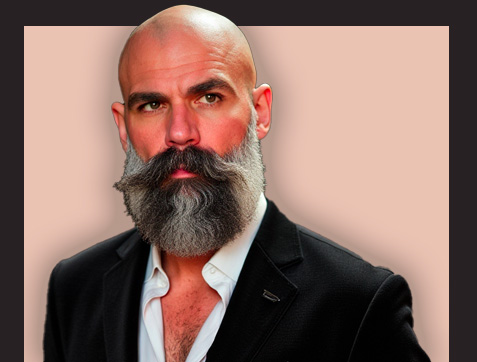
Can AI-generated headshots replace professional photography for business portraits?
As AI headshot generators continue to evolve and improve, a common question arises: can these AI-powered tools truly replace professional photography for business portraits? While AI-generated headshots offer numerous advantages, it’s important to consider both the pros and cons when deciding between AI and traditional photography for your professional images.
When to use AI headshots & when to opt for a professional photographer
The decision to use AI headshots or hire a professional photographer often depends on specific needs and circumstances. AI headshots are ideal for situations where time and budget constraints are significant factors, or when a large number of consistent headshots are required quickly. They’re also great for professionals who need to update their headshots frequently or want to experiment with different looks. On the other hand, opting for a professional photographer might be preferable for high-stakes situations, such as executive portraits for annual reports or key marketing materials, where capturing the nuances of personality and brand image is crucial.
Combining AI tools with professional photography for optimal results in AI photography
Rather than viewing AI headshot generators and professional photography as mutually exclusive options, many businesses are finding success in combining both approaches. For example, a company might hire a professional photographer for key executive portraits or special events, while using an AI headshot generator for general staff photos or regular updates. This hybrid approach allows businesses to leverage the strengths of both methods, ensuring high-quality, personalized images for critical uses while maintaining efficiency and consistency across the organization.
Pros & cons of AI headshots vs. traditional photography
AI headshots offer several advantages over traditional photography, including cost-effectiveness, convenience, and the ability to quickly generate multiple looks. They also provide consistency across large teams and the flexibility to update headshots regularly without the need for new photo shoots. However, AI-generated images may lack the personal touch and nuanced creativity that a skilled photographer can bring to a portrait session. Traditional photography allows for more control over lighting, composition, and capturing the subject’s personality in a way that AI might not fully replicate.
How to create professional headshots using an AI generator?
Creating professional headshots with an AI generator is a straightforward process that can yield impressive results when done correctly. By following a few key steps and best practices, you can ensure that your AI-generated headshots look polished and professional. Let’s explore how to make the most of this innovative technology.
Tips for uploading the best selfies for AI enhancement for business headshots
The quality of your input photo significantly impacts the final AI-generated headshot. To get the best results, follow these tips when uploading selfies for AI enhancement: Ensure good lighting, preferably natural light that evenly illuminates your face. Choose a neutral background to make it easier for the AI to isolate and enhance your portrait. Face the camera directly, with your eyes open and a natural expression. Avoid heavy makeup or accessories that might interfere with the AI’s facial recognition. Wear solid-colored, professional attire that contrasts with your background. Take multiple photos and select the clearest, most natural-looking one for uploading.
Customizing facial expressions & attire in AI-generated photos
One of the advantages of AI headshot generators is the ability to customize various aspects of your portrait. Many tools allow you to adjust facial expressions, ranging from serious and professional to friendly and approachable. You can often modify your attire as well, changing colors or styles to suit different professional contexts. Some advanced AI generators even offer options to alter hairstyles or add accessories like glasses. When customizing your AI headshot, consider the intended use and audience for the image. Aim for a look that aligns with your professional brand and the expectations of your industry.
Step-by-step guide to generating your first AI headshot
To create your first AI headshot, start by selecting a reputable AI headshot generator. Once you’ve chosen your tool, the process typically involves the following steps: First, upload a clear, well-lit selfie or existing photo of yourself. Next, select your preferred style or template from the options provided by the AI tool. This might include choices for background, lighting, and overall aesthetic. After making your selections, initiate the AI generation process. The AI will analyze your photo and apply enhancements based on your chosen style. Once the initial result is generated, you’ll usually have the option to make further adjustments or regenerate the image with different settings. Finally, review the AI-generated headshot and download the high-resolution version for use.
What are the best practices for using AI-generated headshots on LinkedIn & other professional platforms?
As AI-generated headshots become increasingly popular, it’s important to understand how to use them effectively and ethically on professional platforms like LinkedIn. While these tools offer convenience and quality, there are considerations to keep in mind to ensure your online presence remains authentic and professional.
Ensuring authenticity and transparency with AI-generated images & AI professional headshots
When using AI-generated headshots on professional platforms, transparency is key. While there’s no strict requirement to disclose that your headshot is AI-generated, it’s good practice to be open about it if asked. The goal of using an AI headshot generator should be to present a polished, professional image, not to misrepresent yourself. Ensure that the AI-generated image still looks like you and accurately represents your current appearance. If the AI tool offers significant enhancements or alterations, use these features judiciously to maintain authenticity.
Legal & ethical considerations of using AI-generated photos for professional businesses
When using AI-generated headshots, it’s important to be aware of potential legal and ethical implications. Ensure that you have the right to use and modify your input photo, especially if it was taken by someone else. Be cautious about using AI tools that might incorporate elements from copyrighted images into your generated headshot. Additionally, consider the policies of professional platforms regarding profile photos. While most platforms don’t explicitly prohibit AI-generated images, it’s wise to review their terms of service. As the use of AI in professional imagery evolves, stay informed about any emerging guidelines or best practices in your industry regarding the use of AI-generated headshots.
Optimizing AI headshots for different social media platforms
Different professional platforms may have varying requirements or expectations for profile photos. When using AI-generated headshots, consider optimizing them for each specific platform. For LinkedIn, for example, aim for a professional, approachable look with a clean background. On other platforms, you might opt for a more casual or creative style. Pay attention to image dimensions and cropping requirements for each platform to ensure your AI-generated headshot displays correctly. Some AI headshot generators offer presets or templates optimized for popular social media platforms, which can be helpful in creating platform-specific variations of your professional portrait.
How can businesses implement AI headshot generators for corporate use?
For businesses looking to leverage AI headshot generators for corporate use, implementing these tools effectively requires careful planning and coordination. From ensuring brand consistency to managing large-scale headshot production, there are several factors to consider when integrating AI headshot technology into your corporate workflow.
Managing & organizing AI-generated headshots for large teams
For larger organizations, managing a high volume of AI-generated headshots can be challenging. Implement a systematic approach to organizing and storing these images. Consider using a centralized digital asset management system to keep track of all AI-generated portraits. Establish a naming convention for files that includes employee names, departments, and creation dates. Regularly update and archive headshots to ensure they remain current. Some AI headshot generators offer enterprise solutions with features like bulk processing and integration with HR systems, which can streamline the management of corporate headshots for large teams.
Integrating AI headshot tools into company branding guidelines
To maintain a cohesive corporate image, it’s crucial to integrate AI headshot generators into your existing branding guidelines. This involves selecting an AI tool that allows for customization aligned with your brand aesthetics. Define specific parameters for AI-generated headshots, such as background styles, lighting preferences, and dress codes. Create templates or presets within the AI tool that reflect your company’s visual identity. By establishing clear guidelines for AI-generated headshots, you can ensure that all employee portraits contribute to a unified and professional corporate image across various platforms and materials.
Training employees to use AI headshot generators effectively
To ensure consistent quality and adherence to corporate guidelines, it’s important to train employees on how to use AI headshot generators effectively. Develop clear instructions on how to take suitable selfies for AI enhancement, including tips on lighting, background, and posing. Create a step-by-step guide for using the chosen AI tool, highlighting important features and customization options. Consider conducting workshops or webinars to demonstrate the process and address common questions. Encourage employees to experiment with the tool while providing support to ensure the final headshots meet company standards. By empowering employees to create their own professional AI headshots, businesses can maintain up-to-date and consistent corporate imagery with minimal administrative overhead.
Frequently Asked Questions
What is an AI headshot generator for professional headshots?
An AI headshot generator is a tool that uses artificial intelligence to create high-quality, professional-looking headshots without the need for a professional photographer. It allows users to upload their photos and generate realistic, custom AI headshots in minutes, perfect for business and professional use.
Are there free AI headshot generators available?
While some AI headshot generators offer free trials or limited free versions, most professional-grade AI headshot generators require a paid subscription. However, these tools are often more cost-effective than hiring a professional photographer for business headshots.
How do I create professional AI headshots using an AI headshot generator?
To create professional AI headshots, simply upload your photos to the AI headshot generator of your choice. The AI will then analyze your features and generate multiple options based on various headshot styles. You can then select and customize the ones you like best to create your perfect professional business headshot.
Can AI professional headshot generators create realistic headshots?
Yes, modern AI headshot generators use advanced algorithms and custom AI models to create highly realistic headshots. These realistic AI headshot generators can produce images that are often indistinguishable from those taken by professional photographers.
How long does it take to generate AI headshots?
One of the main advantages of using an AI headshot generator is speed. Most AI photography tools can create professional headshots in minutes, allowing you to get professional-looking business photos without the hassle of scheduling a photo shoot.
Can I use AI-generated professional headshots for my LinkedIn profile or company website?
Absolutely! AI-generated professional headshots are perfect for use on LinkedIn profiles, company websites, business cards, and other professional platforms. They provide a polished, consistent look for your professional online presence.
Are there AI headshot generator apps for mobile devices?
Yes, there are several AI headshot generator apps available for both iOS and Android devices. These mobile apps allow you to create professional business headshots on-the-go, making it easy to update your professional image whenever needed.
How do AI professional headshot generators compare to traditional photo editors?
While traditional photo editors require manual adjustments and editing skills, AI headshot generators use artificial intelligence to automatically enhance and stylize your photos. This makes the process faster and easier, especially for those without advanced photo editing skills.
Can I customize the style of my AI-generated headshots?
Yes, most AI headshot generators offer various customization options. You can often choose different backgrounds, lighting styles, and even clothing options to create professional business photos that match your desired look and brand image.
Are there any limitations to using an AI headshot generator for professional headshots?
While AI headshot generators have become incredibly advanced, they may sometimes produce images with minor inconsistencies or artifacts. Additionally, some industries or organizations may have specific requirements for headshots that AI-generated images might not meet. It's always best to check your industry standards before using AI-generated headshots for official purposes.